Saturday, 30 June 2012
Interfacing
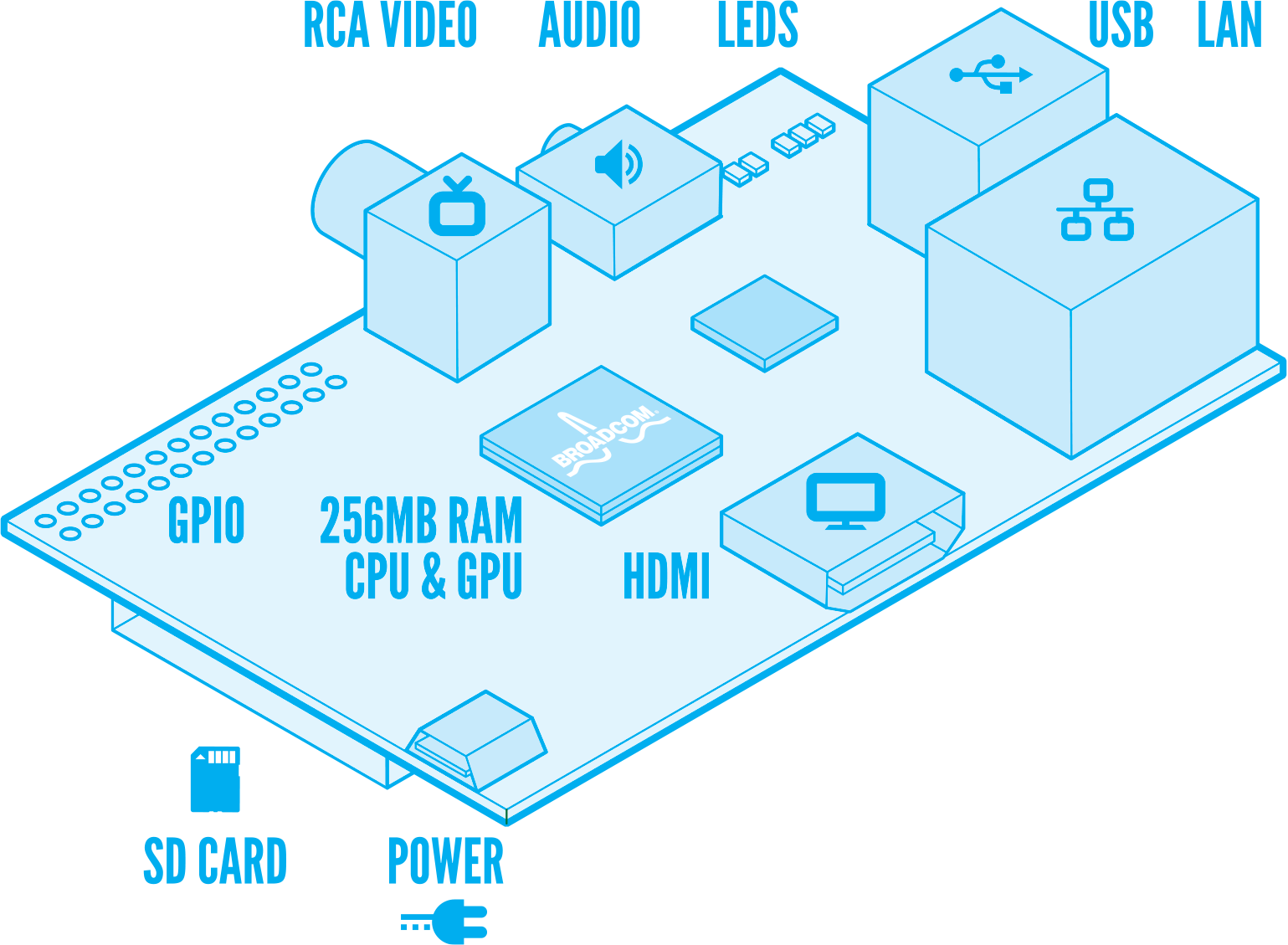
The anatomy of the Raspberry Pi includes a set of general purpose input/output (GPIO) pins which are on the left of the image below. The pins are general purpose insofar as they can be used for anything the user desires, unlike the HDMI, for example, which has a sole specified purpose of carrying video and audio. The GPIOs allow the Raspberry Pi to control electronic circuits by using a library (in Python or C) to send (output) or receive (input) signals through the GPIO header. The Raspberry Pi GPIO is low powered, so will typically require an expansion board to drive higher powered components such as lamps and motors etc.
Because the GPIO is directly controlled through the processor, there is a potential problem of destroying the RPi by making incorrect connections, however, some protection is afforded by using the expansion board.
There are a bunch of starter projects being described on the Raspberry Pi forums which give enough detail to get from beginner (2 years of "electronics" a second level school doesn't count for much twenty years later!) to a working smile circuit. The potential is basically endless, it would be interesting to find some application where the RPi through a web interface could switch on/off, say central heating system; maybe develop this further to email if the temperature is above/below some predefined level. For now, if I could successfully make a traffic light on a breadboard, I'd be happy.
There are probably a lot of things I could/should be doing next week, but the possibility to play with a breadboard, a bunch of resistors and LEDs might take precedence! So Maplin it is on Monday morning...

Thursday, 28 June 2012
Pick a number, any number
I have been learning C lately, just for the craic, and was trying to write a small program on the RPi to roll a dice - still not programming the next space shuttle - which to my mind should be very easy since there is a random number function in C - the output of a number of iterations was a little too predictable though:
Even though I have been learning to program for quite a while, I have never used a random number generator for anything. It comes as a surprise when computers aren't behaving as I expect - this is one of the limitations of being self-taught, that you don't get some of the very basics about how computers behave. This type of thing is probably covered in Programming in C 101, but had me thinking I should play the numbers in the Lottery this weekend!
Why is a random number function so predictable??
Because the rand() function is seeded with the same number everytime - so the function is pseudo-random really. A truly random number generator will use some non-constant value as a seed, typically system time.
 |
| 2, 5, 4, 2, 6, 2, 5, 1, 4, 2 |
Why is a random number function so predictable??
Because the rand() function is seeded with the same number everytime - so the function is pseudo-random really. A truly random number generator will use some non-constant value as a seed, typically system time.
Tuesday, 26 June 2012
Watch your P's and p's
I have photos and duplicates of photos everywhere on my PC, laptop etc. and have been trying to find a piece of software to organise my digital photos for a long time, and have never found exactly what I was looking for, so I have attempted to come up with a solution myself.
I was careful when renaming files according to my own predefined convention based on date taken. I use XnView to extract the relevant EXIF metadata and rename the files as follows:
My problem is I haven't been so careful about the file extensions in XnView. There is an option to have the file extension convert to UPPERCASE or lowercase - I used have both unfortunately. The problem occurs when I have duplicates of photos which have the same name, but a different extension case - and Linux is case sensitive. I end up with duplicates of the same photo simply because the extension is different.
Now I am trying to write a script to untangle the mess I have created...
I was careful when renaming files according to my own predefined convention based on date taken. I use XnView to extract the relevant EXIF metadata and rename the files as follows:
YYYY-MM-DD HH-MM-SS {Camera Model}
This is working perfectly as it has generated a unique filename for all of my photos (I don't tend to do bursts which would all have the same timestamp) and I have been able to separate the photos into a directory structure base on YYYY/MM using the following simple shell script:#!/bin/bash # Sorts the files in the current folder to relevant folder ../YYYY/MM based on each file name for file in * do Year=$(echo $file | cut -c-4) Month=$(echo $file | cut -c6-7) $(mv -n "$file" ../$Year/$Month/) done
My problem is I haven't been so careful about the file extensions in XnView. There is an option to have the file extension convert to UPPERCASE or lowercase - I used have both unfortunately. The problem occurs when I have duplicates of photos which have the same name, but a different extension case - and Linux is case sensitive. I end up with duplicates of the same photo simply because the extension is different.
Now I am trying to write a script to untangle the mess I have created...
#!/bin/bash

#######################################################################
######          Converts a file extension to lowercase           ######
#######################################################################

# Counter variables
renamed=0 # this counts the number of files which were renamed
skipped=0 # this counts the number of files which were not renamed

# Loop thru the files in the current directory
for file in *
do
 # Extract the filename and extension from each file
 filename=$(echo "${file%.*}")
 EXT=$(echo "${file##*.}")

 # Convert the extension to lowercase
 ext=$(echo "${EXT,,}")

 # Proposed filename and extension
 newFile=$(echo "${filename}.${ext}")

 # Rename the file only if the extension was NOT already in lowercase
 if [ $ext != $EXT ];
 then
  # Check if the proposed new filename already exists
  if [ -e $newFile ];
  then
   # Add a duplicate identifier to end of filename
   newFile=$(echo "${filename}_01.${ext}")
  fi

  # Rename the file
  echo "Renaming file: $file >>>>> $newFile"
  $(mv '$file' '$newFile')
  # Increment renamed files counter
  renamed=$((renamed+1))
 else
  echo "Skipping file: $filename.$ext"
  # Increment skipped files counter
  skipped=$((skipped+1))
 fi
done

# Output summary information
echo "There were $renamed files renamed and $skipped files skipped"
It's not quite there yet; I need to get it to work recursively down a directory structure eventually, but first I need to make sure it works. Anyone know why I am getting a too many arguments error for the file exists test on line 28??? Help???
Monday, 18 June 2012
Ruby on Rails on Raspberry Pi
Success! I have managed to get Ruby on Rails installed on the RPi on Saturday, although quite when it finished, I don't know! The instructions I had followed warned that the process would take a while, but I hadn't expected it to take sooooo long! I went to bed at 2am and the installation which started at 11.30pm was still going! When I checked back on Sunday morning it had completed with the latest versions of Ruby & Rails installed (I subsequently rolled back to Rails version 3.0.10 for the Server Side Web Tech course)

In the meantime, I was making sure that Rails was also installed and working correctly on my laptop - I have some homework to get finished before Monday! Having the same Rails versions installed side-by-side on (reasonably) standard hardware and the RPi will give me an opportunity to benchmark the credit card sized hardware. I suspect that Ruby on Rails on RPi (RoRoR!) will be slower to execute a similar instruction than the laptop or any other "conventional" hardware; Rails might be beyond its intended scope.
I'll have a go at both simultaneously and see how the Raspberry Pi compares.

In the meantime, I was making sure that Rails was also installed and working correctly on my laptop - I have some homework to get finished before Monday! Having the same Rails versions installed side-by-side on (reasonably) standard hardware and the RPi will give me an opportunity to benchmark the credit card sized hardware. I suspect that Ruby on Rails on RPi (RoRoR!) will be slower to execute a similar instruction than the laptop or any other "conventional" hardware; Rails might be beyond its intended scope.
I'll have a go at both simultaneously and see how the Raspberry Pi compares.
Saturday, 16 June 2012
Who's been looking at your blog??
While checking out the stats on this blog I noticed that there were some unexpected views from US (80 pageviews), and Germany (2) along with a whopping 156 pageviews from (probably) my classmates in Ireland - hello fellow HDSWTECHers!

I should probably offer an apology to anyone who arrived on this blog expecting some useful insight and original information about the RPi; this is blogging for blogging sake - I am being graded on it...
So here's my tip: there is plenty of useful, insightful and informative content on the RPi elsewhere, such as the Raspberry Pi site and the excellent tutorials on Raspberry Pi Beginners YouTube channel.
What I have been doing (instead of installing all those packages which would support the Web Technologies course) is putting an XBMC image on another SD card - I suspect a large majority of the Raspberry Pi's have been bought solely for this purpose.

The image of choice for now is Raspbmc which is an XBMC and linux-based OS distribution for Raspberry Pi - the beauty of the RPi is that the Raspbmc OS image can be loaded on a separate SD card (2GB is sufficient) to the Debian image. This means that the RPi can be very simply booted as a media center which can playback 1080p content, or as a learning tool providing command line or GUI interfaces for learning to program, depending on the SD card being used at any particular time.
So here's my tip: there is plenty of useful, insightful and informative content on the RPi elsewhere, such as the Raspberry Pi site and the excellent tutorials on Raspberry Pi Beginners YouTube channel.
What I have been doing (instead of installing all those packages which would support the Web Technologies course) is putting an XBMC image on another SD card - I suspect a large majority of the Raspberry Pi's have been bought solely for this purpose.
I have been a fan of XBMC for a long time. When the original Xbox was succeeded by the Xbox360, the price of the original console fell dramatically to the extent that a second-hand console could be had for about €20 (sometimes including a few games).
The Xbox Media Center (XBMC) was an open source project which hacked the Xbox games console and replaced the stock dashboard with a customisable media centre which allowed users to play games, watch video, listen to music and/or view pictures on their television sets. This is one of the reasons that the NSLU2 I had cut my Linux teeth on was replaced by an old PC which runs Ubuntu Server - the NSLU2 was stretched beyond its capabilities and the user xperience from my couch was slow loading and frequent buffering.
The XBMC project has since left the original console behind, concentrating on HTPC's, jailbroken Apple TV's and iPads as well as running as as applications in Windows, Mac OS and Linux. Consequently, they no longer support the original console directly although the community is keeping the releases reasonably up to date although the original hardware struggles with some modern video formats.
Friday, 15 June 2012
Where's my MegaBytes?
Before installing a variety of packages associated with the H. Dip. in Web Technologies course, I noticed something strange about the operating system image that I had written to the newly acquired 8GB SD Card; my megabytes had disappeared! The size output below should add up to close to 8GB rather than somewhere less than 2GB!
Following this excellent step-by-step tutorial, I was able to 'recover' the lost space on the SD card.
The root (/) has 5.6GB space available giving me more than enough space to install Ruby on Rails, Apache, MySQL, and space to learn to develop web applications.
pi@raspberrypi:~$ df -h
Filesystem            Size  Used Avail Use% Mounted on
tmpfs                  94M     0   94M   0% /lib/init/rw
udev                   10M  168K  9.9M   2% /dev
tmpfs                  94M     0   94M   0% /dev/shm
rootfs                1.6G  1.2G  300M  80% /
/dev/mmcblk0p1         75M   28M   47M  37% /boot
Following this excellent step-by-step tutorial, I was able to 'recover' the lost space on the SD card.
The root (/) has 5.6GB space available giving me more than enough space to install Ruby on Rails, Apache, MySQL, and space to learn to develop web applications.
pi@raspberrypi:~$ df -h
Filesystem            Size  Used Avail Use% Mounted on
/dev/mmcblk0p2        7.3G  1.3G  5.6G  19% /
tmpfs                  94M     0   94M   0% /lib/init/rw
udev                   10M  164K  9.9M   2% /dev
tmpfs                  94M     0   94M   0% /dev/shm
/dev/mmcblk0p1         75M   28M   47M  37% /boot
Thursday, 14 June 2012
Looking after the pennies
A piece of advice which I was given by an accountant friend is to store the money as an integer, i.e. in cent, or pence, depending on your currency. Why? Because, computers are imprecise he said... Nonsense!
Take this example:
When I was young I got 10p every Sunday as pocket money - I could do with this what I wanted, the shopkeeper invariably got it! But if I wanted to get a Beano comic, I'd have to be disciplined and save up to £1 - ten weeks of torture*. Pythonically, this arrangement can be expressed as:
This should give me my £1, right? Every week, my savings are increasing by £0.10p after all.

It looks like I would have to save for an extra week to get my Beano. What happened? A computer cannot precisely represent 0.1 in binary, at least not in a finite amount of memory because in binary it is 0.000110011001100... As a result, the computer stores an approximation of 0.1 for my allowance, but the error builds and becomes more significant with successive operations.
Scaled up in a real-world scenario with many multiples of transactions, this would an accountant crazy. You simply cannot have money go missing. The advice I received was to work in pennies and divide by 100 whenever you need to display the amount.
* I have no idea how much the Beano cost back then.
Similarly, I noticed on the package in which my Raspberry Pi was shipped this telephone number which reminded me to post about storing data in an appropriate format in a database.

Telephone numbers should be stored as a string - you are never going to be doing sums with telephone numbers are you?
Take this example:
When I was young I got 10p every Sunday as pocket money - I could do with this what I wanted, the shopkeeper invariably got it! But if I wanted to get a Beano comic, I'd have to be disciplined and save up to £1 - ten weeks of torture*. Pythonically, this arrangement can be expressed as:
allowance = 0.1
saving = 0.0
for weeks in range(10): saving += allowance
This should give me my £1, right? Every week, my savings are increasing by £0.10p after all.

It looks like I would have to save for an extra week to get my Beano. What happened? A computer cannot precisely represent 0.1 in binary, at least not in a finite amount of memory because in binary it is 0.000110011001100... As a result, the computer stores an approximation of 0.1 for my allowance, but the error builds and becomes more significant with successive operations.
Scaled up in a real-world scenario with many multiples of transactions, this would an accountant crazy. You simply cannot have money go missing. The advice I received was to work in pennies and divide by 100 whenever you need to display the amount.
* I have no idea how much the Beano cost back then.
Similarly, I noticed on the package in which my Raspberry Pi was shipped this telephone number which reminded me to post about storing data in an appropriate format in a database.

Telephone numbers should be stored as a string - you are never going to be doing sums with telephone numbers are you?
Video & First Program
Finally, I have gotten around to doing an unboxing video. There are tonnes of these on youtube already, but this mine. I have re-imaged the SD card with the Debian OS again just to give a sense of the setup procedure, so the video goes through unboxing, to first boot into the GUI environment. Enjoy!
I won't be getting a job programming the next generation of Space Shuttle, but at least it is a little more meaty than the pythonic Hello World:
There are probably better ways to implement this script, but I'm happy enough to pass it off as a first attempt to program on the RPi.
ppsn.py
The output screenshot is from a SSH session into the RPi - the OpenBSD Secure Shell is disabled on startup by default, but can be easily enabled as follows:
First Program
I have also written a first Python program since the operating system comes pre-installed with Python. Rather than going with the default Hello World! program, I tried to challenge myself by writing a program which will check a user's PPS number - this is the Irish Personal Public Service Number which comprises 7 digits followed by a check character, which is derived from a mod23 checksum.I won't be getting a job programming the next generation of Space Shuttle, but at least it is a little more meaty than the pythonic Hello World:
print "Hello World"
There are probably better ways to implement this script, but I'm happy enough to pass it off as a first attempt to program on the RPi.
ppsn.py
# Initialisation of variables
sum = 0
letters = "WABCDEFGHIJKLMNOPQRSTUV"

# Set loop condition
done = False

# Loop until valid input is received
while not done:
 ppsn  = raw_input('Enter a PPSN to check: ')

 # Check for correct length
 if (len(ppsn) == 8):
  # Check that first 7 characters are numbers
  if ppsn[0:6].isdigit():
   # Last character must be alphabetical
   if ppsn[7].isalpha():
    done = True
   else:
    print "The last character must be a letter"
  else:
   print "The first 6 characters must be numbers"

 else:
  print "The PPSN must be 8 characters in length, i.e. 7 digits & 1 letter"

# Checksum
for i in range(0,7):
 num = int(ppsn[i]) # cast num to integer type
 sum += num * (8-i)

# Get mod23 of sum to get position of check character
mod = sum % 23

# Correct for modulus equal to 0
if (mod == 0):
 mod = 23

# Output results
if (ppsn[7] == letters[mod]):
 print ppsn + " is a valid PPSN"
else:
 print ppsn + " is not valid"
The output screenshot is from a SSH session into the RPi - the OpenBSD Secure Shell is disabled on startup by default, but can be easily enabled as follows:
sudo mv /boot/boot_enable_ssh.rc /boot/boot.rc
 |
| Output of first program written on RPi in Python |
Next steps:
Course related:- Re-install web server (apache)
- Re-install RDBMS (mysql)
- Install Ruby on Rails
- Git???
- Install OpenCV
- Get a webcam working, then get a second one working
- Write a dissertation on Stereo Image Object Extraction
Friday, 8 June 2012
Oi! What do you two think you're doing?
Seemingly, the RPi is highly desirable in the Duplo community...

Now, back the that Project Proposal Definition for Server Side Web Technologies :-(

Now, back the that Project Proposal Definition for Server Side Web Technologies :-(
Thursday, 7 June 2012
Linux: My Brief History
I am currently trying to get a Software Requirements Specification written, so there is no time to play with the RPi today, instead I can give a quick background to my life with Linux - when in fact I should be writing something about a conceptual description of an e-commerce website.
 |
| Roku Network Music Player |
About 8 years ago, I had a couple of Roku Soundbridge network music players in the house and was looking for a way to serve music from my MP3 library to these devices without running my PC 24/7 - the PC was probably consuming about 180W. The Roku forums mentioned a device which could fulfil the music server needs while consuming no more than 10W. The NSLU2 by Linksys is a Network Storage Link for USB2.0 Disk Drives, which was intended as a low cost file server to share your external HDD and USB flash drives with the rest of your network. However, since the underlying system was Linux-based, the open-source community managed to flash it with a modified operating system image called uNSLUng which essentially turned it into a small Linux computer, which could run a web server, network monitor, print server, and many other applications beyond its original intended use.
 |
| Linksys NSLU2 |
Interest piqued, I salvaged an old HP Compaq computer which was cobbled together using RAM from here, disks from there and installed Ubuntu Server onto it with a view to learning Linux and maybe having a file server as well as some other services available within a home network - the Slug being relatively underpowered was unable to cope with more than two or three servers without struggling (music buffering, file server hanging, web server time-out and so on). That PC is still acting as my home server, and because it is going to be running anyway, the services previously running on the NSLU2 have been moved on the it although it consumes about 80W.
So things have come fully circle and the NSLU2 has been retired, but I intend to resurrect it as a web server which would be isolated from my more valuable files. In the meantime, Ubuntu has also become my preferred desktop environment.
So things have come fully circle and the NSLU2 has been retired, but I intend to resurrect it as a web server which would be isolated from my more valuable files. In the meantime, Ubuntu has also become my preferred desktop environment.
Raspberry Web Server
LAMP (Linux, Apache, MySQL and PHP)
I managed to install a LAMP stack onto the Raspberry Pi last night - not for any particular reason, other than to try it out on something I would be comfortable with. The installation was relatively painless, somewhat similar to my experience with a headless Ubuntu Server which I have been running, wrecking and rebuilding for some time now. The only issue encountered was the lack of a fully qualified domain name (FQDN) which Apache complained about at first, but worked without difficulty after rebooting. I will upload a video of the RPi operating, tomorrow...
The MySQL installation is opportune as it also serves to re-familiarise myself with the mysql> command line which is relevant to the Introduction to Computing & Web Technologies module in the H. Dip. in Science in Web Technologies that I am currently undertaking - this is the only reason I now find myself writing a blog if truth be told!!!
That's about as much progress as I have made so far with the RPi, other than to play around with the GUI, which I found to be slow in terms of response time, but it cost $25! I would imagine I would probably use it to continue to familiarise myself with the Linux command line, where it will be adequate to do some scripting, learning C, Python, Ruby etc. After all, that's what they were developed for; there is the added benefit of leaving the server in my attic to serve music, files, video etc. around the house, without the panic and worry of losing files, music, movies and photos whenever I do something I shouldn't have.
 |
| What happened next? |
Matters unrelated
On a positive note, I shot a record (for me) 42 points at Knightsbrook Golf Club this morning; I will probably go out on Sunday and miss every fairway, have a horrible day with the putter and duff every iron. But, usually you will get something out of a round to bring you out again the next day.
If anyone is interested in golfing, there are some fantastic deals available at course in Dublin and hinterland. I have only taken up the game last year, but have been lucky to play some really great courses locally for not very much money.
Incidentally, the picture on the right was taken last week at Headfort Golf Club (near Kells, Co. Meath) on the Old Course. The putt was from about 40ft. and we managed to capture the ball right before it dropped in, or did it? Answers on a postcard etc.
None of this is in any way relevant to the Raspberry Pi, I just wanted to brag about my score today!
Tuesday, 5 June 2012
Setup & Running
While I have the latest recommended Debian image downloading from the good folks at www.raspberrypi.org - all 465MB of it, I am just gathering the remainder of the hardware together:
 |
| Wireless Mouse, Keyboard & Unifying receiver, 4GB (minimum) SD Card HDMI lead and ethernet cable not pictured |
The operating system image will be written to the SD Card and, hopefully, we will be off & running.
This post is becoming a running commentary since there is little to be gained from sitting and watching the progress bar. The image file has been downloaded; I have uncompressed the file (now 1.9GB) and am trying to get the image file written to the SD Card, but Ubuntu's dd command isn't behaving... Going to try to get the Image Writer utility from the Ubuntu Software Center to see if that works.
The SD Card is written with the operating system image - the Image Writer utility did the trick! I am going to start a new post with the first run and maybe add a video.
Thank you Mrs. Postman...
 Look what arrived this morning!
I should probably have made an unboxing video, but excitement got the better of me!!! So, the next steps are to download an operating system image and write it to a SD Card. My Linux flavour of choice will be Debian which is the family to which my laptop operating system, Ubuntu, also belongs.
I have bought a Logitech wireless keyboard and mouse previously which will hopefully work out of the box. Otherwise, there is nothing to do except to crack on with the operating system installation and see what this little pc can actually do!!
Subscribe to:
Posts (Atom)